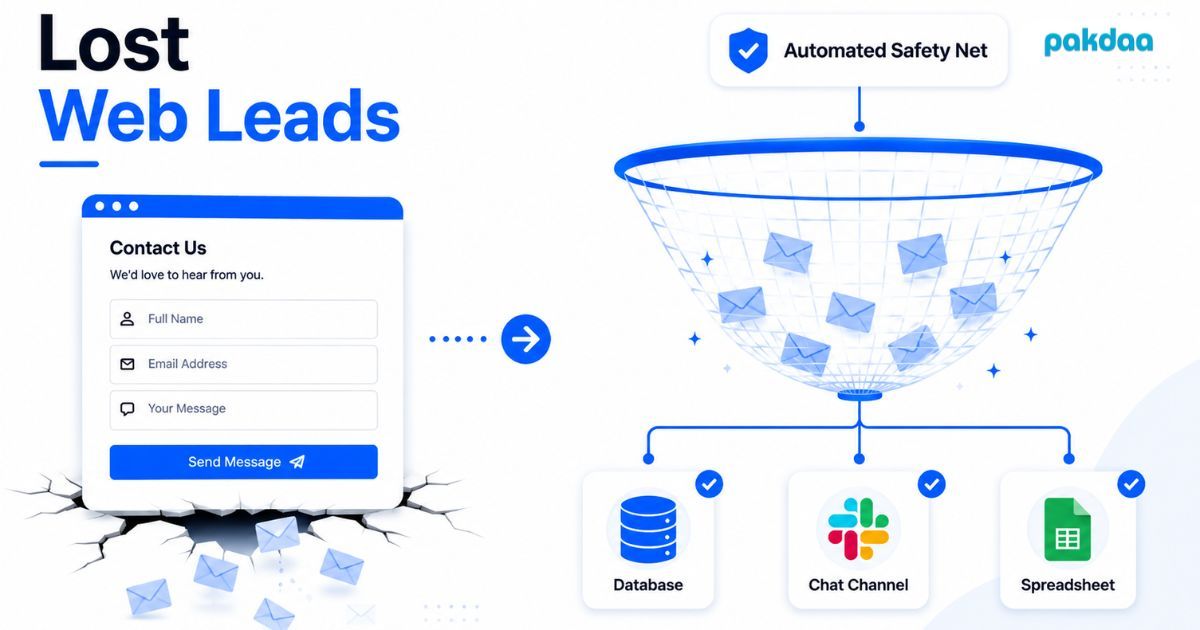
You paid for the click. Someone landed on your site, read your pitch, and filled out your contact form. They saw the thank-you message. And then nothing happened, because the notification email never reached you.
That is a lost web lead. Not a cold lead or a slow lead. A person who tried to hand you money and vanished into a gap in your setup.
Lost web leads are the most expensive problem on most websites, and the easiest one to miss. The form looks fine. It submits. The thank-you page loads. But one wrong setting behind the scenes sends every enquiry straight into nowhere, while you keep paying for ads that feed a broken funnel.
Where lost web leads actually come from
Most business owners assume a form either works or throws an error. The truth is messier. A form can submit perfectly and still lose the lead in four different ways.
The form fails silently
The visitor hits submit, the page says "thanks", and the notification email never sends. Usually it is an SMTP or deliverability problem: a misconfigured mail setting, an expired plugin, a hosting change nobody flagged. The visitor sees success. You see an empty inbox.
Your reply is too slow
Even when the email lands, timing kills the deal. Research widely cited from Harvard Business Review found businesses that respond within five minutes are far more likely to qualify a lead than those who wait even 30. If an enquiry sits overnight, the buyer has usually already messaged three competitors.
The alert lands in spam
Some forms do send, but the notification drops into a junk folder or a shared inbox nobody actually checks. Same result as a silent failure: the lead is technically "captured" and practically gone.
One channel, no backup
Most forms have a single delivery path, and that path is email. If email breaks, there is no second copy anywhere. No database row. No spreadsheet entry. Nothing to recover. The lead is simply erased.
The true cost of a lost web lead
Here is why this matters more in 2026 than it did five years ago: traffic is expensive. You are paying more per click across Google and Meta than ever, and form abandonment already sits high. Studies of online forms put abandonment somewhere between 68% and 81% depending on the research method. So you fight hard to get the small share who actually submit. Losing even a few of those to a broken pipe is the costliest mistake on the whole site.
The maths is brutal once you put real numbers on it.
Three lost leads a month sounds small. At a ₹40,000 deal value it is over fourteen lakh a year, on top of the ad spend you already paid to generate those enquiries. And a 5% silent-failure rate is conservative. We have audited client websites where the number was far worse, because nobody had tested the form since launch.
Every fix, ranked
Not all fixes are equal. Some patch one hole. Some make the whole pipeline redundant. Here they are ranked from weakest to strongest, so you can see exactly what each one buys you.
The pattern is clear. Testing catches problems by luck. Better email fixes one cause. A second alert channel adds a little redundancy. But only a real backup, where the submission is stored permanently and pushed to more than one place the moment it arrives, protects you against the whole list.
How to set up an automated backup for your contact form
You do not need to rebuild your site. You need to add a second and third path so a single failure can never erase a lead. Here is the order our team sets it up in.
Step 1: Store every submission server-side first
Before any email is sent, write the raw submission to storage you control. This becomes your source of truth. If every other path fails, the lead still exists in your records.
Step 2: Send notifications through a transactional email service
Route form emails through a dedicated sending service instead of raw server mail. Deliverability jumps, and silent failures from bad mail config mostly disappear.
Step 3: Push each entry to a second live channel
Send every submission to a channel your team already watches all day: Slack, WhatsApp, or Discord. Now a buried or spammed email cannot cost you the lead, because a second alert fires instantly.
Step 4: Log everything to a database or spreadsheet
Mirror every entry into a database or a simple sheet. This gives you a searchable history, lets you spot missing leads, and doubles as a light CRM before you invest in a real one.
Step 5: Add a failure alert
Set up one alert that tells you if a delivery path stops working. The worst kind of broken form is the one nobody notices for three months. A simple health check ends that.
Step 6: Test the whole path monthly
Submit a real test entry and confirm it reaches every channel. Five minutes a month is cheaper than one lost deal.
Stop paying to lose leads
If you spend anything on getting people to your site, a form with a single point of failure is a slow leak in a bucket you keep refilling. Fixing lost web leads is not a big rebuild. It is a backup layer that turns "I hope this works" into "I know every enquiry is saved". That is the difference between guessing and knowing where your leads go.
Not sure if your form is quietly losing leads?
We will audit your contact form and lead capture path for free, then show you exactly where enquiries could be leaking and how to back them up.
Get a free form audit