Most agencies treat a submitted form as the finish line. Someone filled it in, job done. But a submission is really a starting line, and everything that should happen next, tagging, storing, routing, alerting, tracking, reporting, is where the manual work piles up and leads go cold.
Automation fixes this, and the key that unlocks it is integration. When you integrate a client's form with the tools around it, an enquiry flows through the entire lifecycle in seconds with nobody copying anything. That is how you automate lead management across many clients without adding headcount.
Here is what form integration actually means, the pipeline it builds, and how to set it up once and replicate it per client.
The lead lifecycle, and where it stalls
A lead should move through six stages. Manually, it stalls between every one of them.
Every gap in the manual column is a delay and a chance to lose a lead. We put real numbers on that cost in our guide to the hidden cost of managing forms manually. Integration removes the gaps.
What form integration actually means
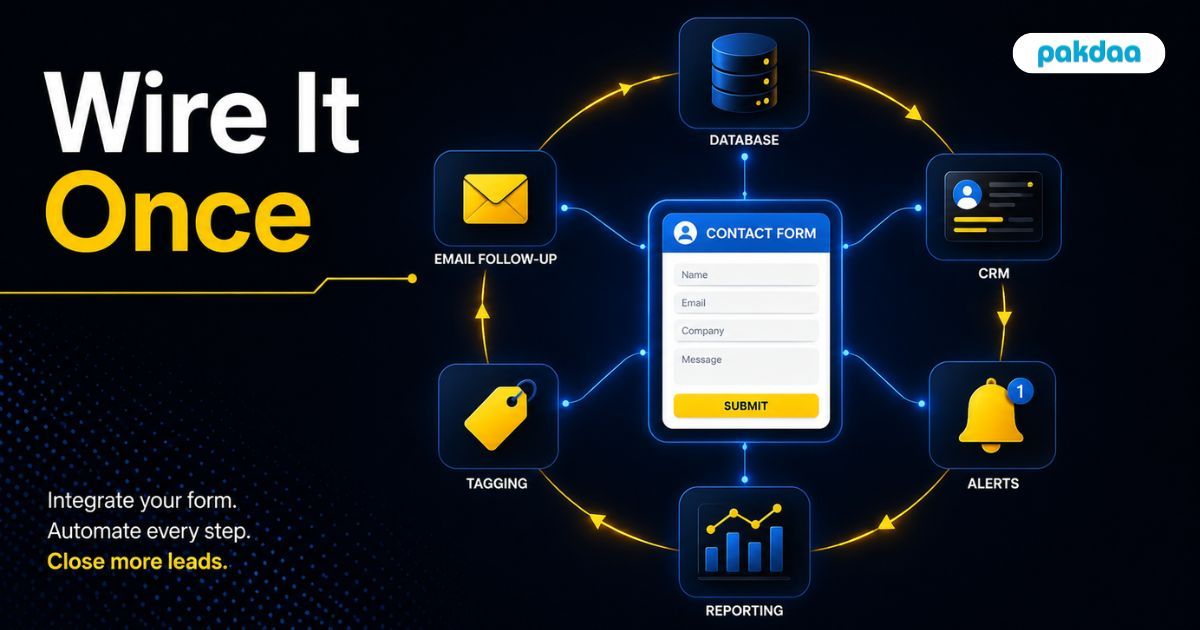
Integration is simply wiring your form to the other tools so data passes between them automatically. When the form is submitted, it does not just email you. It triggers a chain: the data is sent to a store, to a CRM or tracker, to an alert channel, and to reporting, all through connections like webhooks and APIs that fire the moment a lead arrives.
You are not asking a person to move data between systems anymore. You are letting the systems talk to each other directly.
The integration map: what connects to what
Here is what a fully integrated form connects to, and what each connection automates.
Building the automated pipeline
Set it up in this order and each step builds on the last.
Step 1: Capture into a central store
Wire every form to write its submission to one central store the instant it is submitted. This is the spine everything else connects to, and the same foundation behind our guide to managing many forms from one dashboard.
Step 2: Tag and enrich automatically
On capture, stamp each lead with the client, source, and campaign it came from. Automated tagging is what keeps a hundred clients' leads sortable and reportable.
Step 3: Route and alert instantly
Trigger an alert to the right person the moment a lead lands, so replies happen in minutes. Speed is the whole point: leads engaged within five minutes qualify far better than those reached after 30, per research widely cited from Harvard Business Review.
Step 4: Push into the CRM or tracker
Have the integration create the lead in your CRM or tracker with a status already set, so no one types it in and nothing is forgotten.
Step 5: Trigger reporting
Feed the same data into live reporting or a client portal, so the client sees leads without you assembling anything by hand.
Step 6: Monitor the integrations
Add a check that alerts you if any connection fails. Integrations can break silently, so monitoring is what keeps the automation trustworthy.
Here is what changes when the pipeline runs itself.
Doing it per client, at scale
The real win is repeatability. Build the integration pipeline once as a template, then replicate it for each new client with their own tags and destinations. The first setup takes effort. Every client after that is a copy, not a rebuild, so the cost of onboarding a new client's leads drops close to zero.
The gotchas to watch
Automation is not set-and-forget. Three things to respect. First, integrations fail silently, so monitoring is essential, not optional. Second, field mapping matters, a mismatch sends data to the wrong place, so test each connection with a real lead. Third, do not automate the human part, let the pipeline handle the plumbing and let people handle the actual conversation that wins the deal.
The bottom line
The form is the start of the lead lifecycle, not the end, and everything after it is where leads leak when you do it by hand. Integrate the form with your store, CRM, alerts, and reporting, and the whole chain runs itself: captured, tagged, stored, routed, tracked, and reported in seconds. Build it once, replicate per client, and you automate lead management at a scale manual work could never touch. If you want the integrations built for your agency, that is exactly what our team does.
Want your client leads to manage themselves?
We will integrate your client forms with your store, CRM, alerts, and reporting, so every lead is captured, routed, and tracked automatically. Built once, reused per client. Free to scope.
Book a free integration call