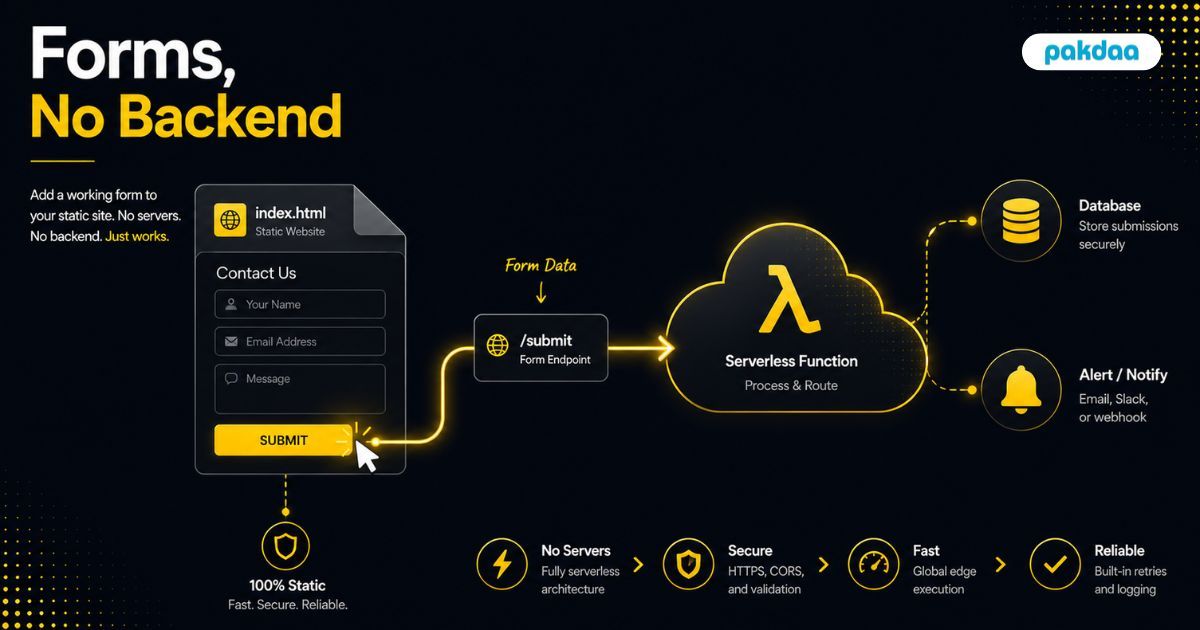
You built a fast static site. You dropped in a contact form. You clicked submit to test it, and nothing happened. No email, no error, no lead. Just a form that looks right and does nothing.
This is the wall almost everyone hits with static sites, and it confuses people because the form looks perfectly normal. The issue is simple: a static site has no server to catch what the form sends. The good news is that you do not need one. You can add a working form to a static website with no backend at all, using a few modern approaches.
Here is why static sites cannot process forms alone, the real no-backend options, and how to wire one up step by step.
Why a static site cannot handle a form by itself
An HTML form is just the input part. It collects a name, email, and message, and on submit it tries to send that data somewhere to be processed. On a traditional site, a server catches it, stores it, and emails you.
A static site has no such server. Static hosting only serves files, HTML, CSS, images, so there is nothing running to receive the submission. The form sends its data into the void. That missing "catch and process" step is the whole problem, and it is exactly what the methods below provide without a full backend.
The good news: no backend needed
You have three realistic ways to catch static-site submissions without running a server.
Form endpoint services
The easiest option. You point your form at a URL provided by a service, and it catches every submission, then emails you or stores it. Services like Formspree, Basin, and similar handlers do this. There is almost nothing to build: you set the form's action to their endpoint and you are done. For most static sites, this is the right first choice.
Serverless functions
When you want more control, a serverless function is a tiny piece of code that runs on demand to receive the submission. You write what happens next: validate it, store it, send it to a CRM, ping a channel. No server sits running, the function only fires when a form is submitted. This is the choice when you need custom logic or want to own the flow end to end.
Your host's built-in form handling
Some static hosting platforms include basic form capture out of the box. If you are already on one, this can be the quickest path of all: enable it, and submissions get captured for you. It is convenient, though usually less flexible than the other two.
Where do the submissions actually go?
This is the part people skip, and it costs them leads. However you catch the submission, make sure it is stored, not just emailed. If the only record is a notification email and that email fails, the lead is gone with no way to recover it. Save every submission to a store you control, and treat email as an alert on top. We make the full case in our guide to storing form submissions instead of emailing them.
Do not forget spam
A public form on a static site gets hit by bots just like any other. Before you go live, add quiet protection, a honeypot field, a time check, and validation, so junk does not bury your real enquiries. The full method is in our guide to protecting your contact form from spam.
How to add a form to a static site, step by step
Here is the full flow, using a form endpoint service as the simplest example.
Step 1: Build the HTML form
Write a normal form with the fields you need and a submit button. Keep it minimal: name, one contact method, and a message. Something like this:
<form action="https://your-endpoint-url" method="POST">
  <input type="text" name="name" placeholder="Your name" required />
  <input type="email" name="email" placeholder="Your email" required />
  <textarea name="message" placeholder="Your message" required></textarea>
  <button type="submit">Send</button>
</form>
Step 2: Pick your no-backend method
Choose a form endpoint service for the fastest setup, a serverless function if you need custom logic, or your host's built-in handler if it has one.
Step 3: Point the form at it
Set the form's action to your endpoint URL, or have it call your serverless function. This is the connection that replaces the missing server.
Step 4: Make sure it stores submissions
Confirm each submission is saved to a store you control, not just emailed. This is your safety net against lost leads.
Step 5: Add spam protection
Add a honeypot field and a time check so bots do not flood you. Do this before launch, not after the junk arrives.
Step 6: Test end to end and set notifications
Submit a real test entry and confirm it is stored and that you get an alert. Set up notifications to a channel you watch so you can reply fast.
What a static form still needs
No backend does not mean no requirements. A form you can trust still covers these.
How to add a form to a static site, step by step
Here is the full flow, using a form endpoint service as the simplest example.
Step 1: Build the HTML form
Write a normal form with the fields you need and a submit button. Keep it minimal: name, one contact method, and a message. Something like this:
<form action="https://your-endpoint-url" method="POST">
  <input type="text" name="name" placeholder="Your name" required />
  <input type="email" name="email" placeholder="Your email" required />
  <textarea name="message" placeholder="Your message" required></textarea>
  <button type="submit">Send</button>
</form>
Step 2: Pick your no-backend method
Choose a form endpoint service for the fastest setup, a serverless function if you need custom logic, or your host's built-in handler if it has one.
Step 3: Point the form at it
Set the form's action to your endpoint URL, or have it call your serverless function. This is the connection that replaces the missing server.
Step 4: Make sure it stores submissions
Confirm each submission is saved to a store you control, not just emailed. This is your safety net against lost leads.
Step 5: Add spam protection
Add a honeypot field and a time check so bots do not flood you. Do this before launch, not after the junk arrives.
Step 6: Test end to end and set notifications
Submit a real test entry and confirm it is stored and that you get an alert. Set up notifications to a channel you watch so you can reply fast.
What a static form still needs
No backend does not mean no requirements. A form you can trust still covers these.
Doing this across many sites
For a single site, a form endpoint service is quick and fine. If you run many static sites, it is worth routing them all into one place instead of a separate service per site, which we cover in our guide to managing many forms from one dashboard. This is part of the wider shift to delivering sites without managing servers.
The bottom line
A static site cannot process a form on its own because it has no server, but that is not a reason to add one. A form endpoint service, a serverless function, or your host's built-in handler all catch submissions with no backend. Point your form at one of them, make sure it stores every submission, add spam protection, and test it end to end. Do that and your fast static site gets a form that actually works. If you want it set up and made reliable for you, that is exactly what our team does.
Static site form not doing anything?
We will wire your static site form to a no-backend setup that captures, stores, and alerts on every submission, with spam protection built in. Free to sort out.
Book a free form setup call